EUR 0
A larger monthly allowance than low-volume free alternatives. Run real delivery or service rounds and keep using Starter within its limits.
- 1,500 stops / month
- Up to 3 vehicles
- 5 active users
- No paid overages

Turn your daily stop list into efficient routes for every vehicle. Hawler helps delivery and service teams cut planning work, avoid unnecessary driving and make better use of the fleet they already have.
Free Starter plan
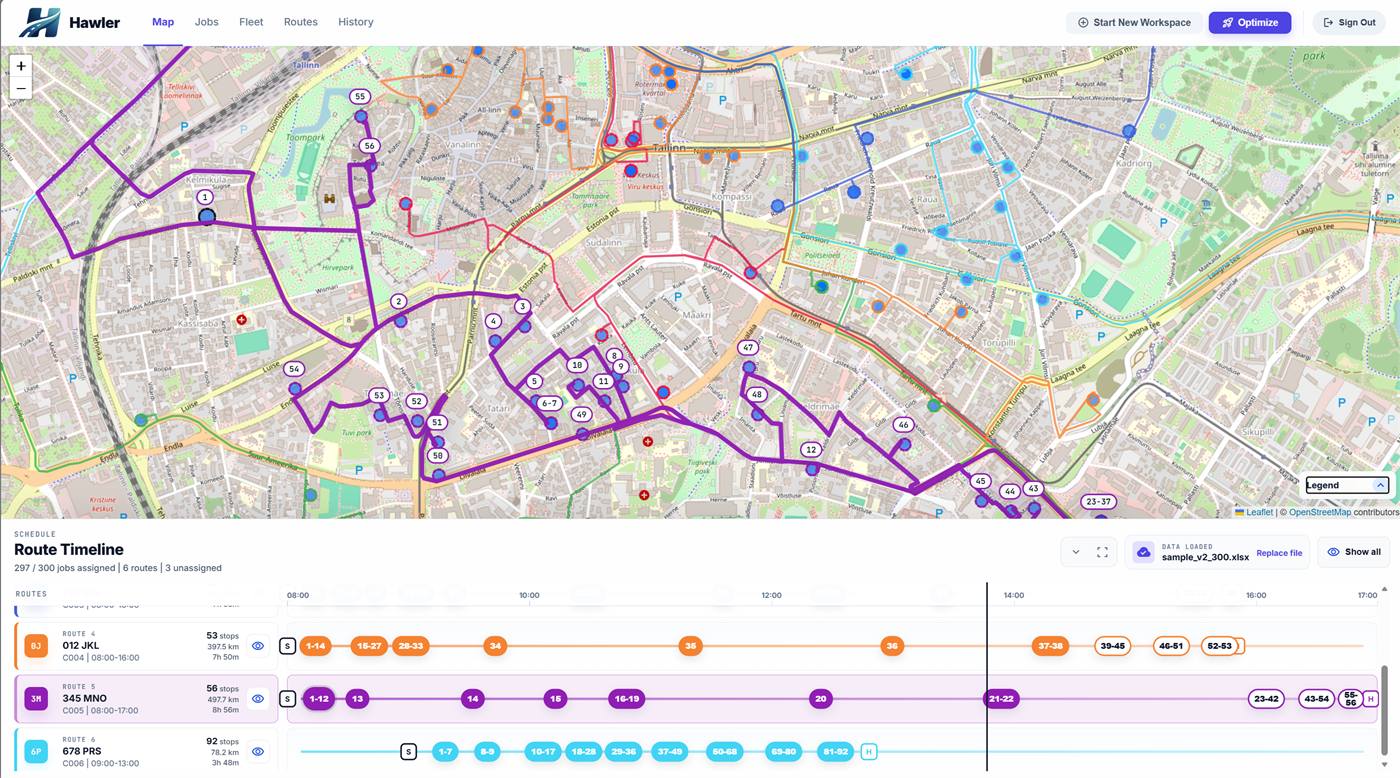
Built for the working day
Address cleanup, vehicle assignments and route handovers all take time. Bring them into one planning workflow, with particular attention to the address lists Baltic teams work with every day.
Match addresses in Lithuania, Latvia and Estonia despite abbreviations, spelling variations and inconsistent formatting. Review the locations and focus on flagged exceptions.
Allocate stops across vehicles using their capacity and working hours. Include time at each stop to build routes around the work your team needs to do.
Review routes, stop order and planned arrival times on the map. Spot unassigned work and check the day's plan before handing it over.
Export ordered stops as route sheets or Excel workbooks. Your team gets a clear plan through the channels you already use.
Spend less time assembling the plan and more time running the operation.
The workflow
Import an Excel workbook with addresses, quantities and time needed at each stop.
Review the address matches and resolve flagged stops before planning.
Add or import vehicles with their capacity, working hours and starting points.
Plan across the fleet, then inspect routes, arrival estimates and unassigned stops.
Export route sheets or Excel workbooks for your drivers and field teams.
Start with one working day and see what changes in your plan.
Explore the workflow for your operation, or work through the costs and capacity that better routes can change.
See how Excel import, address review and multi-vehicle optimization fit into one daily workflow.
Plan delivery rounds around order quantities, unloading time and the vehicles available today.
Account for time on site and travel between customers when planning your field team's day.
Understand the effect on fuel, planning time and customer capacity, then measure it with your own routes.
Pricing
More capacity to work with for free. More fleet for your money when you grow. Hawler combines a generous free allowance with paid plans that include multiple vehicles and users, instead of a licence fee for every driver.
The complete planning workflow is included in every plan: Excel import, address matching, fleet optimization, map review and route exports.
View supported countriesEUR 0
A larger monthly allowance than low-volume free alternatives. Run real delivery or service rounds and keep using Starter within its limits.
Plus
EUR 39/mo
Excluding VAT
Plan for up to 10 vehicles on a single-driver software budget, with 15 users included.
EUR 390
More vehicles, more users and a larger stop allowance in one plan. Grow your operation without buying a licence for each driver.
Custom
For larger operations with agreed limits and billing.
Bring your stops and vehicles. Build a route plan, check it against your usual approach and give your team a clear starting point. Start free and keep using Starter within its limits.
Google Analytics measures this site without analytics cookies by default. This continues when you decline cookies. See our Cookie Policy.